How To Post A Press Release On Facebook
You spent days perfecting your company announcement, but pasting the link on your feed just earned you three likes—two of which are from your own staff. Here’s why the algorithm buried it.
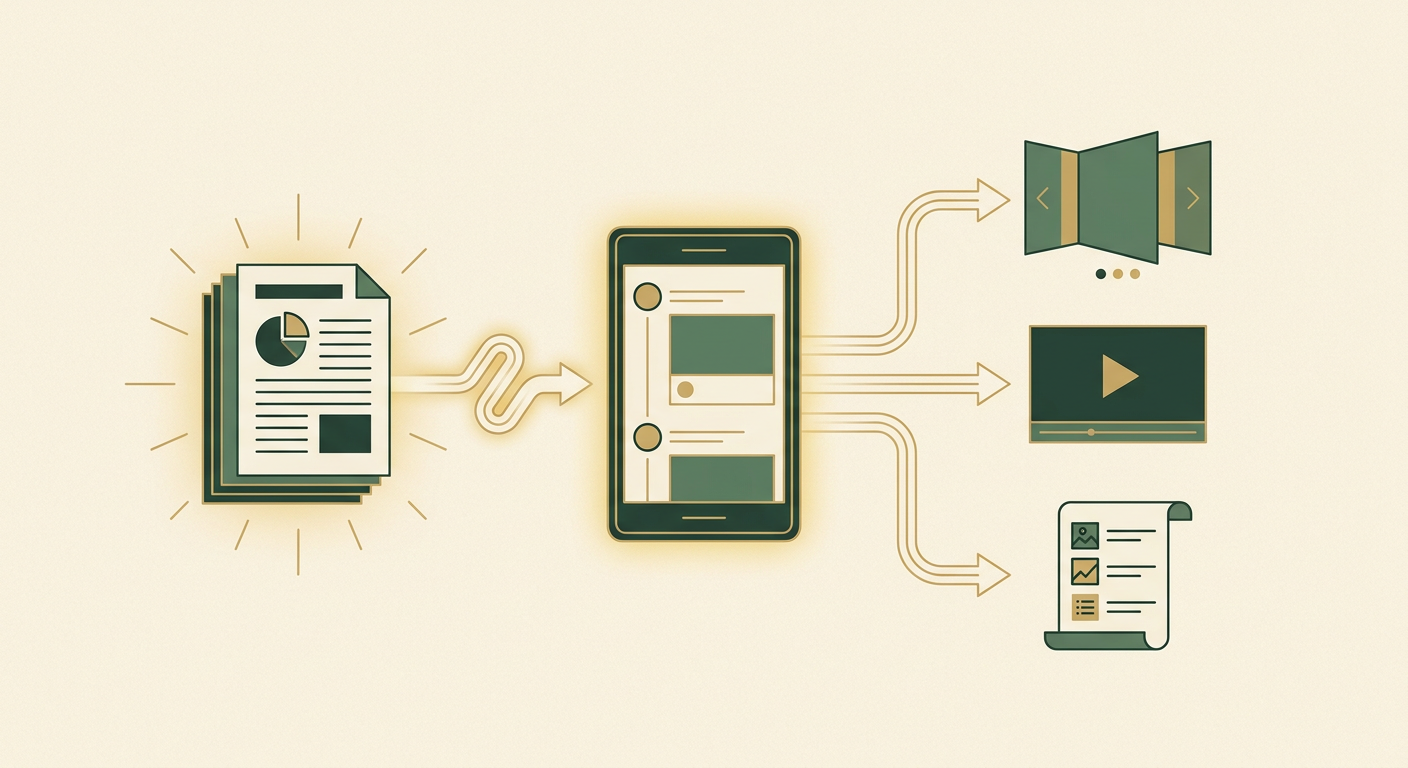
Posting an external URL directly to your timeline is a guaranteed way to kill your organic reach. Today’s social platforms penalize outbound links. To get eyes on your news, you have to decode the current algorithmic rules and build natively for the feed.
The Dead Link Epidemic
You know the feeling. You just finalized a major press release detailing a critical product launch or funding round. You drop the URL onto your company page, hit publish, and wait for the accolades.
What actually happens on the ground? Absolute silence.
The organic reach on your page flatlines. Your analytics show a handful of impressions and zero click-throughs. You are burning time, energy, and capital creating announcements that vanish into the void. It feels like you are shouting into an empty room while paying a premium for the microphone.
Why Your Corporate Updates Are Invisible
The standard approach to corporate news distribution on social media is entirely broken. Founders and operators treat social feeds like a basic RSS feed.
They write a corporate headline, paste a link to their website or newsroom, and expect their audience to gladly leave the platform to read a 600-word wall of text.
Here is the uncomfortable truth: platforms actively penalize outbound links. The 2026 algorithm is a retention engine designed to keep users scrolling. If your post exists solely to drive traffic away from the app, their AI will ruthlessly suppress it in the feed.
You cannot fight this algorithm with volume. Pumping out more links just trains the system that your page is a low-value spam farm.
The Shift to Zero-Click Native Content
The only way out of this trap is a structural pivot to zero-click content.
Instead of treating the platform as a distribution pipe, you must treat the platform as the final destination. You have to extract the most valuable insights from your announcement and deliver them completely in the feed.
When you give the algorithm what it wants—high dwell time, deep engagement, and native media—it rewards you with disproportionate reach. I have seen company pages double their organic visibility overnight just by stripping the outbound links from their initial posts.

The 2026 Playbook for Facebook Announcements
Stop relying on textbook theory and outdated advice. If you want leverage, here is the exact framework we use to turn corporate news into algorithmic fuel.
Deconstruct the Release into Native Formats
Never post the whole document. Break your announcement down into native, scroll-stopping formats that fit user habits.
Extract the three core data points and build a swipeable image carousel. Pull the strongest quote from your CEO and turn it into a text-only post with a high-contrast background. If you have the bandwidth, shoot a short vertical video summarizing the news.
Native formats force longer watch times, which signals high relevance to the AI and triggers wider distribution.
Zero-Click Social Post Generator
You are a social media strategist. I will paste a corporate announcement below. Extract the single most important metric or milestone. Turn it into a 3-slide text carousel outline suitable for Facebook, keeping sentences under 15 words per slide. Do not include any external links.Weaponize the First 6 Hours of Engagement
The current algorithm decides the fate of your post within the first few hours of it going live.
You need rapid, authentic conversations to trigger wider distribution. End your post with a polarizing question or a direct request for feedback.
When comments come in, do not just leave a generic like. Reply thoughtfully to every single one to create deep comment threads. High-velocity early engagement acts as a multiplier for your total algorithmic reach.
Deploy the Link-in-Comment Funnel
You still need to drive traffic to your pricing or signup pages, but you cannot put the link in the main caption.
Instead, drop the link in the first comment of your own post. Alternatively, use an auto-responder tool to direct message the link to anyone who comments a specific trigger word.
This keeps the initial post entirely clean, satisfies the retention algorithm, and drives high-intent clicks from genuinely engaged users.
Your 7-Day Launch Sequence
You do not need a massive agency team to execute this. Here is your tactical checklist for the next week to transition away from dead links.
- Day 1-2: Finalize your core announcement and ensure all stakeholders approve the text before the embargo lifts.
- Day 3: Extract the primary highlight and draft three distinct zero-click assets (a carousel, a text post, and a short video script).
- Day 4: Pre-schedule your native formats natively in the app, ensuring absolutely no outbound links are in the captions.
- Day 5: Launch day. Publish the native content and immediately drop your destination URL in the first comment.
- Day 6: Spend 30 minutes replying to every comment to drive the post's relevance score up.
- Day 7: Review your analytics. Double down on the format that earned the highest watch time.

Key takeaways
The algorithm suppresses posts containing outbound URLs; you must pivot to zero-click native content. Deconstruct your announcements into native carousels, text posts, or short videos. Move your essential links to the first comment or use DM automation to preserve reach. Finally, capitalize on the first six hours of engagement by aggressively replying to comments.
See distribution plansFrequently asked questions
Can I still include a link to my website in the main caption?
No. Including outbound links directly in the caption severely limits your organic reach. Place the link in the first comment or use a DM automation tool to send it privately.
What exactly is zero-click content?
Zero-click content delivers the complete value of your message directly within the social media feed, eliminating the need for the user to click away to read an external article.
How long should a video summary of an announcement be?
Keep your vertical video summaries under 60 seconds, ideally around the 30-second mark, to maximize completion rates and algorithmic prioritization.
Why is early engagement so critical to reach?
Social algorithms assess a post's viability based on the interaction it receives in the first few hours. High early engagement signals the system to push the content to a broader audience.
Should I post my full announcement text on my business page?
Never post the entire text block. Break it down into bite-sized, digestible insights or short bullet points that cater to fast-scrolling users.
Keep reading

7 min read
How To Promote A Press Release
Hitting publish is not enough. Discover how top operators repurpose press releases into native social content, leverage founder-led digital PR, and optimize for AI search engines to turn simple announcements into high-impact pipeline and market share.
16 October 2026
4 min read
How Long Should A Press Release Be? (Perfect Length By Use Case)
Discover the optimal press release length for different types of company announcements. Stop guessing word counts and learn how top operators structure product launches, executive hires, and data reports to maximize journalist engagement and secure valuable media coverage.
8 October 2026
5 min read
How To Cite A Press Release (With Examples)
Learn how to properly cite a press release in APA 7, MLA 9, and Chicago 17 formats. Stop pasting raw URLs and start using citations as trust signals to build credibility in your pitch decks and marketing collateral.
5 October 2026Join the conversation
Comments are read by our editors before they appear on the page.